3D Print File Agent: turn a photo into a print-ready 3D file
Send a photo of your pet, a person or an object and get back a 3D model you can print: watertight, sized, flat side down, as an STL and a colour-split 3MF.
- Price
- $12 a month for 20 files
- Launch
- Not live yet: in development
Updated 2026-10-22
Photo → 3D print file3D Print File Agent
What does 3D Print File Agent do?
3D Print File Agent is an AI agent for one job: turn a photo into a print-ready 3D file. You hand it a photo, it works through each step, and it hands back a checked STL and a colour-split 3MF. If something needs your call, it stops and asks once instead of guessing.
- Read sample-dog.jpg
- Built the full 3D model
- Made it watertight at 80 mm · you thickened the tail
- Split colours for 4 filaments
Your part
- 1Upload a clear photo, or up to 4 angles, of one subject on a plain background.
- 2Say how tall it should be and which printer and nozzle you use.
- 3Answer if it asks about thin parts, a base or the number of colours.
- 4Download the STL, the 3MF and the check report, then slice as usual.
Sample output
Real results from our own test runs, not a mock-up. Credits and settings are under each picture.
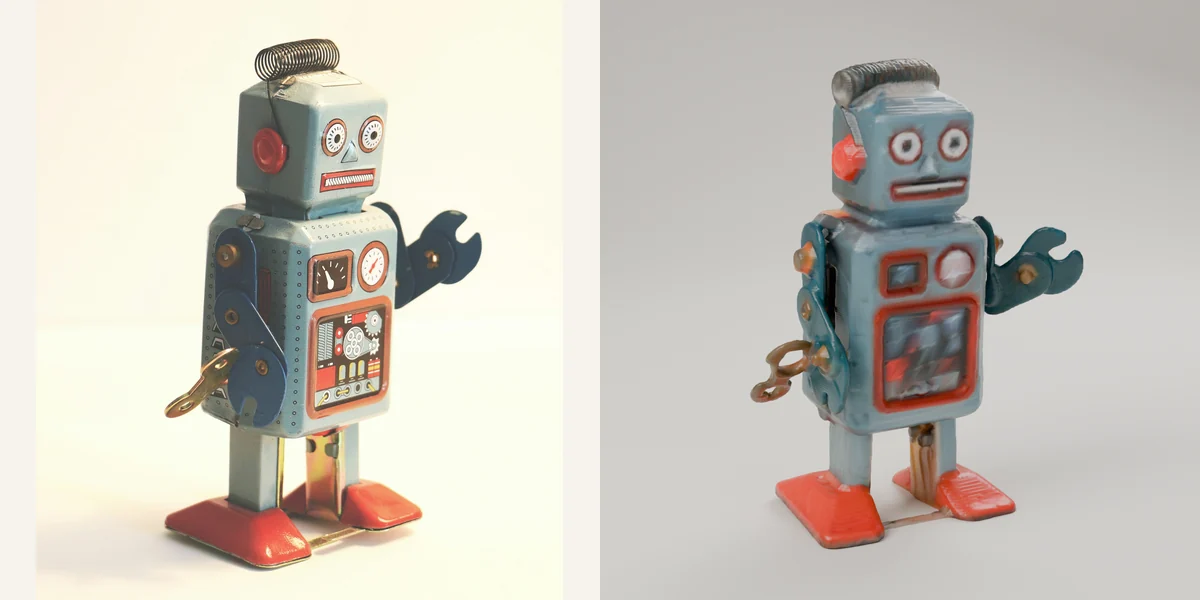
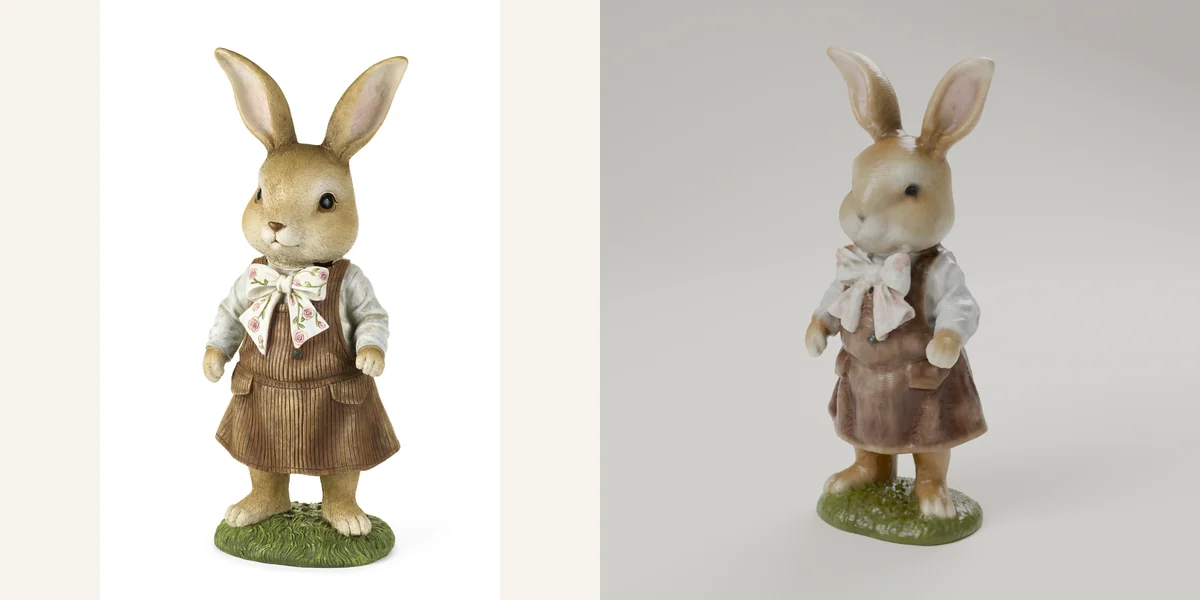
How do you turn a photo into a 3D print file?
Pick a sharp photo of one subject on a plain background and run it through an image-to-3D model, which builds a full mesh. Then repair the mesh so it is watertight, scale it to millimetres, put a flat side down and check wall thickness before you export an STL or 3MF. The agent does every step.
What makes a 3D file print-ready?
A print-ready 3D file is a closed (watertight) mesh at the real size you want, with a flat side to sit on the build plate and no walls thinner than your printer can make. Image-to-3D tools often stop at a raw mesh with holes, loose fragments and no scale, which your slicer then has to repair or reject.
How is this different from an image to STL converter?
An image to STL converter turns brightness into height, so you get a relief or a lithophane with a flat back. The 3D Print File Agent builds a full model you can walk around, like a figurine of your dog, then repairs and checks it. For a relief or a lithophane, the free Image to STL and Lithophane Maker tools on UpAgents are enough.
What does it check before handing the file back?
That the mesh is watertight, the height in millimetres, which side sits on the plate, wall thickness against your nozzle (about two line widths, so 0.8 mm on a 0.4 mm nozzle), overhangs steeper than 45 degrees that need supports, and for multicolour, a colour count your AMS or MMU can hold. The check report lists each result.
Which printers do the files work with?
Any printer whose slicer opens STL or 3MF: Bambu Lab, Prusa, Creality, Elegoo, Anycubic and resin printers. The colour-split 3MF is for multi-material systems such as Bambu Lab AMS, Prusa MMU and Creality CFS. Single-colour printers use the STL.
Free today, before it launches
Tools that run in your browser, and guides to the job.
Run status
You always know where your job is
- Queued
Your job is in line. Nothing has started yet.
- Working
The agent is doing the job, step by step.
- Needs you
It stops and asks you one clear question instead of guessing.
- Ready for you
Your finished work is back with you.
Questions
Can AI turn a photo into a 3D print?
Yes. An image-to-3D model builds a full mesh from one photo and estimates the sides the photo can't show, so the back of a figure is a guess. The 3D Print File Agent then repairs that mesh so it closes, sizes it and checks it for thin parts before you get the file.
Is the file guaranteed to print?
No. The agent checks that the mesh is watertight, sized and placed flat side down, and flags walls too thin for your nozzle and overhangs that need supports. It can't see your printer's settings or filament, so look at your slicer's preview before you print.
STL or 3MF: which do I get?
Both. The STL is the shape only and opens in any slicer. The 3MF keeps millimetre units and splits the model into colour parts, so Bambu Studio, OrcaSlicer or PrusaSlicer can give each part its own filament.
Which photos work best?
One subject, sharp and evenly lit, on a plain background, seen from the side or at three-quarters. Up to four photos from different angles give the hidden sides something real to follow. Busy backgrounds, motion blur and cropped ears or feet give worse models.
What won't it make?
Weapons or weapon parts, and copies of trademarked characters to sell. Your own pets, people who agreed to it, objects you own and art you made are all fine.
Can I make a lithophane or a relief instead?
Yes, and you don't need the agent for that. The free Lithophane Maker and Image to STL tools on this site turn a photo into a printable STL in your browser, and the photo never leaves your device.
How much will 3D Print File Agent cost, and when does it launch?
3D Print File Agent costs $12 a month for 20 files. It isn't live yet; it's in development.